Actions
Form actions are a set of special functions that will execute when a form is submitted. They do not run in the form preview. There are currently two supported actions: email and HTTP Post. An example of the interface is shown below.
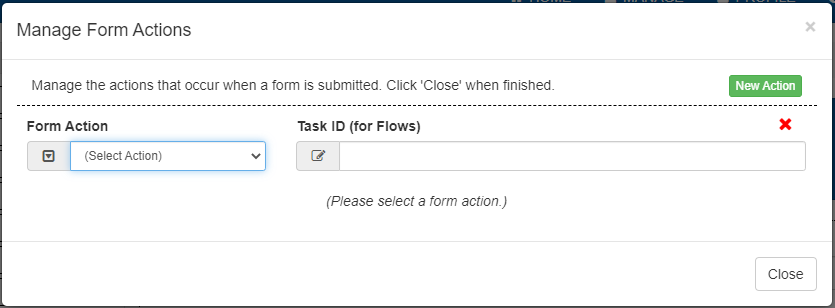
Clicking “New Action” will append an empty action to the list of current actions. Clicking the red X at the top right of an action will remove it. The dropdown on the left allows you to select the action type. The Task ID (for Flows) field to the right allows you to specify which flow step the action will execute on. If no flow step ID is given, the action will run any time the form is submitted.
There are 5 additional options that modify the Action:
Conditional Action: The action will evaluate a condition to determine whether the action should be performed. This uses the same syntax as form Rules.
Include PDF: adds the PDF to the action’s output.
Include Uploaded Attachments: adds any file attachments, such as the upload and scan control’s files, to the action’s output.
Include Signature Attachments: adds signature images to the action’s output.
Include Static Attachments: adds static attachments, such as barcodes, to the action’s output.
Email
An email action will send an email with a custom message to the desired email address.
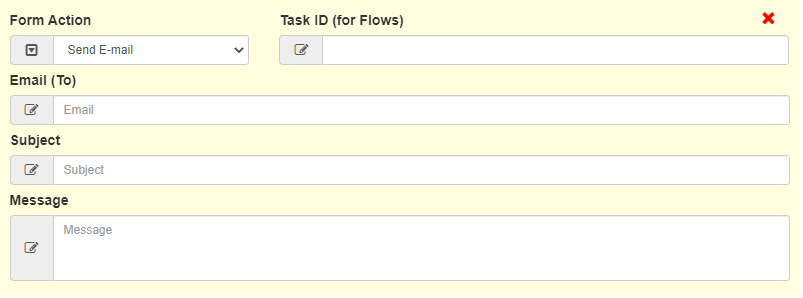
The E-mail (To) field is used to address the recipients of the email. The Subject field will be the subject displayed in the recipients’ inbox. The Message Field will be the content of the email.
Note
Emails are a feature which depend on having a configured SMTP server. For more details, see E-Mail Configuration.
It is also possible to use form information to create a dynamic email.
To do this, include the control name inside curly braces.
Rules engine variables can also be used in curly braces.
When used in a flow, email templates can use a unique variable which provides a link back to the current flow step: {_form.userTaskUrl}.
An example email is below for a form with the controls Email, FName, LName, and total.
//E-mail (To) Field
{Email}

//Subject Field
Transaction Receipt

//Message Field
Dear {FName} {LName},

Thank you for your transaction! The total cost was {total}

Have a good day!
HTTP Post
The HTTP Post actions send multipart/form-data of the submission to the specified URL.
Field names are used as the keys in the post data, and the values are the values of the form controls.
A form XML with the key name form is included in the files, along with any attachment options selected.

Note
If a form is using an HTTP Post action, do not name controls the
with the name form, or form.pdf as this will cause a naming conflict.